<?xml version="1.0" encoding="UTF-8"?>
<!--Generated by Squarespace V5 Site Server v5.13.594-SNAPSHOT-1 (http://www.squarespace.com) on Tue, 09 Jun 2026 04:25:14 GMT--><feed xmlns="http://www.w3.org/2005/Atom" xmlns:dc="http://purl.org/dc/elements/1.1/"><title>f/8 tech blog</title><subtitle>f/8 tech blog</subtitle><id>http://www.austincabot.com/f8-tech-blog/</id><link rel="alternate" type="application/xhtml+xml" href="http://www.austincabot.com/f8-tech-blog/"/><link rel="self" type="application/atom+xml" href="http://www.austincabot.com/f8-tech-blog/atom.xml"/><updated>2009-11-01T08:32:55Z</updated><generator uri="http://www.squarespace.com/" version="Squarespace V5 Site Server v5.13.594-SNAPSHOT-1 (http://www.squarespace.com)">Squarespace</generator><entry><title>weak links | 10.14</title><category term="Links"/><category term="business"/><category term="dontscrewus.org"/><category term="links"/><category term="national geographic"/><category term="reuters"/><category term="yazzy"/><id>http://www.austincabot.com/f8-tech-blog/2009/10/15/weak-links-1014.html</id><link rel="alternate" type="text/html" href="http://www.austincabot.com/f8-tech-blog/2009/10/15/weak-links-1014.html"/><author><name>austin|cabot</name></author><published>2009-10-16T01:02:12Z</published><updated>2009-10-16T01:02:12Z</updated><content type="html" xml:lang="en-US"><![CDATA[<p>I've been cruising the blogosphere lately and have found quite a few sources for inspiration, guidance, and aspirations.&nbsp; I have decided to share these links with you weekly, sometimes as I find them, other times I may save them up and give them to you all in one go.&nbsp; When I put them up all together, I'll be calling them "weak links", for no reason other than I couldn't come up with anything creative to call it.&nbsp; This week I give you pricing help, quotes, inspirational photos, and rights among other things.&nbsp;</p>
<p>I'll start off with <a href="http://digital-photography-school.com/how-to-set-the-price-for-your-photography">this guide</a> to pricing that was posted over at DPS.&nbsp; It's a short read, but one that can help any aspiring photography realize that there is more to setting your costs than just your shooting time.&nbsp; Think about your <em>prep time, equipment costs, processing time, etc</em>.&nbsp; Look beyond the simple act of taking photos and determine your overall costs - pass these on to your client through your prices.&nbsp; I even go as far as to explain to my clients that my pricing includes these things, as well as the knowledge I have.&nbsp; I am not their "uncle bob" with a camera.&nbsp; It is important they know why my prices are what they are.&nbsp; This is something that is slowing becoming forgotten.&nbsp; <em>Great pictures are made by great photographers, not great cameras.</em></p>
<p>Next up are two galleries of images from <a href="http://www.nationalgeographic.com/">National Geographic</a> and <a href="http://www.reuters.com/news/pictures">Reuters</a> that contain images that inspire me.&nbsp; I find that I am becoming more of a fan of photos rather than just photography (the techical and gear side).&nbsp; I've had a backwards progression from most photographers in that <em>I started with a strong technical sense, then moved into creating and appreciating imagery</em>.&nbsp; Most photographers start out because they love to look at pictures, and have to learn the technical aspect afterwards.&nbsp; These galleries meld great technical skills with great imagery, causing me to appreciate them even more.</p>
<p><a href="http://lens.blogs.nytimes.com/2009/10/09/showcase-62/"><span class="full-image-float-left ssNonEditable"><img src="http://i23.photobucket.com/albums/b395/guitarboy8892/Picture1-27.png?__SQUARESPACE_CACHEVERSION=1255655386781" alt="" /></span></a>The <a href="http://lens.blogs.nytimes.com/2009/10/09/showcase-62/">1st gallery</a> is from National Geographic, but the post I found them on is on the New York Times photography blog.&nbsp; It features images from as far back as 1920 and really makes me think a lot about my love for creative photojournalism.&nbsp; I've been working hard on trying to tell a story with my photographs and these images inspire me to do just that.</p>
<p>The <a href="http://www.reuters.com/news/pictures/rpSlideshows?articleId=USRTXPLFV#a=14">2nd gallery</a> is from Reuters.&nbsp; It features unique imagery from created with mirrors.&nbsp; The more I see these types of shots, the more I think about incorporating them into my own work - problem is, I don't have many mirrors around very often when I shoot.&nbsp; Photojournalism doesn't lend itself to moving things around very well. I loose a certain level of control that I have become acustomed to shooting portraits.</p>
<p>I think that's the main reason why in my work for the <a href="http://www.gcsunade.com">Colonnade</a> that I try to shoot the editorial portraits more than anything else.&nbsp; <em>I like control</em>.&nbsp; I've been spoiled.&nbsp; If anything, these images inspire me to keep my eyes open and all the time be looking while I am out shooting.&nbsp;</p>
<p>Next up is <a href="http://ngm.nationalgeographic.com/video/player#/?titleID=nichols-redwoods-gatefold&amp;catID=1">this video</a> from National Geographic.&nbsp; It's a quick behind the scenes look at how they made a image (from 84 different images!) of a 1600+ year old Redwood Tree.&nbsp; It's pretty neat to watch.&nbsp; The end result is pretty amazing as well.&nbsp; I can't image what an undertaking that it would be to create such an image.&nbsp; I'd love to shoot for National Geographic one day (if anyone from NG is out there reading this, I'd love some pointers on how to get to that point).&nbsp;</p>
<p>In addition to the above video, I encourage you to take a tour around the <a href="http://ngm.nationalgeographic.com/photography">National Geographic Photography</a> page.&nbsp; I don't know of a greater collection of images (NG is, afterall, the premier publication for photo work), and I can spend hours just browsing the site.</p>
<p>Another blog I've been following almost since it's inception is <a href="http://www.aphotoeditor.com">"A Photo Editor"</a>, run by former photo director Rob Haggart.&nbsp; This week, he made a posting about what people are doing with new DSLR cameras and their HD video mode.&nbsp; He posted two videos, one of which is below:</p>
<p style="text-align: center;"><object width="640" height="385"><param name="movie" value="http://www.youtube.com/v/kmPp_eRWmaI&hl=en&fs=1&rel=0&color1=0x3a3a3a&color2=0x999999&hd=1"></param><param name="allowFullScreen" value="true"></param><param name="allowscriptaccess" value="always"></param><embed src="http://www.youtube.com/v/kmPp_eRWmaI&hl=en&fs=1&rel=0&color1=0x3a3a3a&color2=0x999999&hd=1" type="application/x-shockwave-flash" allowscriptaccess="always" allowfullscreen="true" width="640" height="385"></embed></object></p>
<p>After showing the video, he posted a quick interview with it's director, <a href="yazzyphoto.com">Yassine (Yazzy) Ouhilal.</a>&nbsp; In it, Yazzy said this:</p>
<p style="font-size: 80%;"><em style="font-size: 110%;">"While I probably could have put something together for this project in just a few days, I really wanted to make an authentic film about the experience of surfing in the Arctic- with all the drama and the hostility of the environment. The editing process was done over &nbsp;3 months. Much like with my photography, I like to distance myself from the content so that I can approach it again with a fresher perspective. It allows me to look at the photos/footage objectively rather than to remain attached to certain shots or clips because of the experience involved with obtaining the imagery. I find that in both photography and filmmaking, being able to &ldquo;let go&rdquo; is an important part of the process. Maybe an image means a lot to me because I endured many hardships to obtain it, but I have to keep in mind that the audience doesn&rsquo;t necessarily know that- therefore will often see less value than I do in a particular shot. Distancing myself from the content for a certain period is definitely part of my approach and it really helps to &ldquo;forget&rdquo; about it in order to rediscover it."</em></p>
<p style="font-size: 80%;"><span style="font-size: 130%;">I absolutley love this (extra long) quote.&nbsp; So many times I get so tied up in my images, that I loose focus.&nbsp; I get to thinking more about how hard it was to obtain the image than how good the actual image is.&nbsp; Sometimes, the photos you work hardest for are actually the poorest photos, while the photos that just happen are the best.&nbsp; It really got me thinking and I think I am going to start letting my images "marinate" for at least a week (unless they are for the paper, right Lissa?).&nbsp; </span></p>
<p style="font-size: 80%;"><span style="font-size: 130%;">For all you strobist types out there, Rob Galbraith has just <a href="http://www.robgalbraith.com/bins/content_page.asp?cid=7-10044-10303">posted</a> new specs on a new <a href="http://www.alienbees.com">Alien Bees</a> monobloc strobe - the Einstein 640.&nbsp; Read his article for more information.&nbsp; They are adjustible all the way down to 2.5ws, which, according to <a href="http://www.strobist.com">David Hobby (strobist.com)</a> is equal to about 1/16 power on a speedlight.&nbsp; I want to read some initial review of production units, but I think I will be saving up for a set of two or three of these for location and studio work.</span></p>
<p style="font-size: 80%;"><span style="font-size: 130%;">Finally, while surfing one of the forums that I am on, I ran across this video that puts a unique perspective on stealing digital images.&nbsp; Watch it below:</span></p>
<p style="font-size: 80%; text-align: center;"><span style="font-size: 130%;"><object width="640" height="385"><param name="movie" value="http://www.youtube.com/v/gMpqTEGyj1I&hl=en&fs=1&color1=0x3a3a3a&color2=0x999999"></param><param name="allowFullScreen" value="true"></param><param name="allowscriptaccess" value="always"></param><embed src="http://www.youtube.com/v/gMpqTEGyj1I&hl=en&fs=1&color1=0x3a3a3a&color2=0x999999" type="application/x-shockwave-flash" allowscriptaccess="always" allowfullscreen="true" width="640" height="385"></embed></object></span></p>
<p style="font-size: 100%; text-align: center;">If you want to learn more, click <a href="http://www.dontscrewus.org">here. </a></p>
<p style="font-size: 100%; text-align: left;">That's all for now.&nbsp; I hope you have enjoyed these links, I've enjoyed finding them.&nbsp; Have a great week and remember to get out there and take some pictures this week.</p>
<p>&nbsp;</p>
<p>&nbsp;</p>]]></content></entry><entry><title>SneakPeak Photo 1.0</title><id>http://www.austincabot.com/f8-tech-blog/2009/9/29/sneakpeak-photo-10.html</id><link rel="alternate" type="text/html" href="http://www.austincabot.com/f8-tech-blog/2009/9/29/sneakpeak-photo-10.html"/><author><name>austin|cabot</name></author><published>2009-09-29T04:39:20Z</published><updated>2009-09-29T04:39:20Z</updated><content type="html" xml:lang="en-US"><![CDATA[<p>I love Apple Computers and the Mac OS X.&nbsp; I've been a mac user for close to 3.5 years now and wouldn't have it any other way.&nbsp; For photographers, I feel like there are a lot of small benefits to using a mac.&nbsp; I find them day in and day out.&nbsp; For you mac users out there, I found a neat little plugin for Finder's Quick Look.&nbsp;</p>
<p>If you don't know, with Mac OS X 10.5 (Leopard) and up, when in finder, you can highlight a file and hit the space bar and be able to preview the file.&nbsp; This is handy for PDFs, Word documents, spread sheets, etc.&nbsp; I also like it a lot for browsing through my photos quickly.&nbsp; Sometimes, I wish I had quick access to the EXIF data in my files, without having to open up any programs.&nbsp; Well, now I can.</p>
<p>I found <a href="http://www.apple.com/downloads/macosx/imaging_3d/sneakpeekphoto.html">SneakPeak Photo 1.0</a> while browsing the downloads section at apple.com.&nbsp; What is allows you to do is view your EXIF data, histograms, copyright data, etc - pretty much everything embedded in the digital image - all within Finder's Quick Look.&nbsp; How neat is that?&nbsp; Below are a few screen shots:</p>
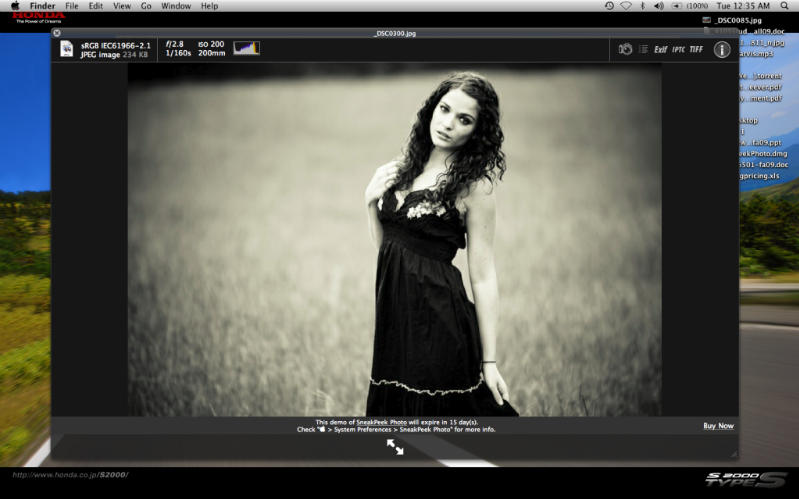
<p>This is the basic screen that pops up when you his the space bar for quick view:</p>
<p><span class="full-image-block ssNonEditable"><span><img src="http://i23.photobucket.com/albums/b395/guitarboy8892/Picture2-11.png?__SQUARESPACE_CACHEVERSION=1254199794096" alt="" /></span></span></p>
<p>&nbsp;You can see the basic EXIF data up top - shutter speed, aperture, ISO, and focal length.&nbsp; You can also see a mini histogram up top.</p>
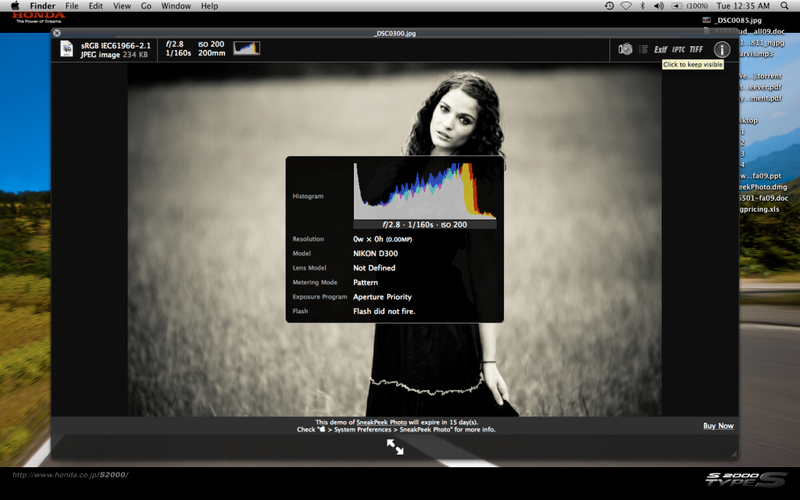
<p>If you click the icons at top right, you get different information:</p>
<p>A larger histogram, Camera Model, Metering Mode, etc.</p>
<p><span class="full-image-block ssNonEditable"><span><img src="http://i23.photobucket.com/albums/b395/guitarboy8892/Picture5-4.png?__SQUARESPACE_CACHEVERSION=1254200003608" alt="" /></span></span></p>
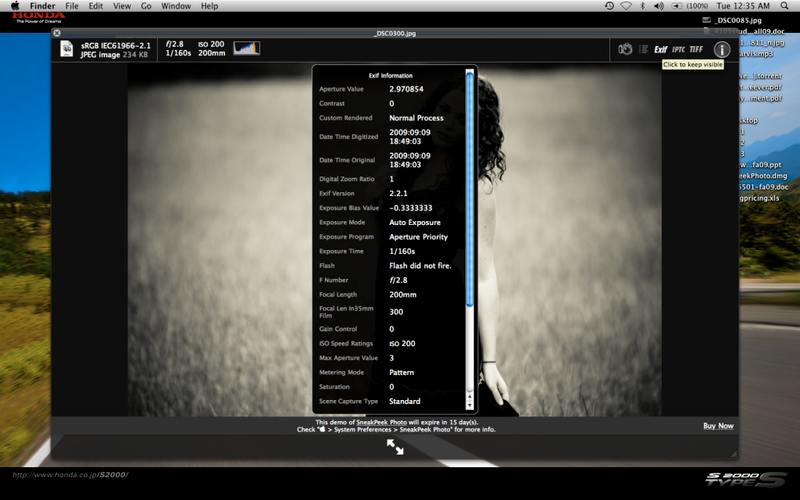
<p>Typical EXIF Data</p>
<p><span class="full-image-block ssNonEditable"><span><img src="http://i23.photobucket.com/albums/b395/guitarboy8892/Picture4-4.png?__SQUARESPACE_CACHEVERSION=1254200161738" alt="" /></span></span></p>
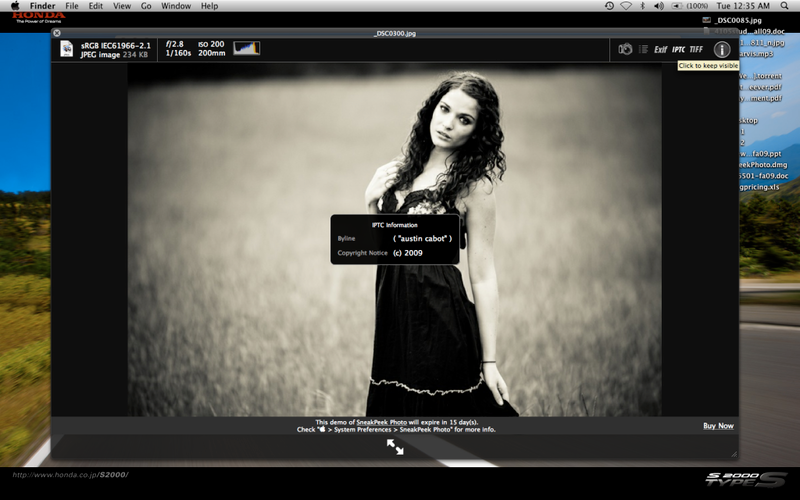
<p>Copyright information<br /><span class="full-image-block ssNonEditable"><span><img src="http://i23.photobucket.com/albums/b395/guitarboy8892/Picture3-7.png?__SQUARESPACE_CACHEVERSION=1254200070977" alt="" /></span></span></p>
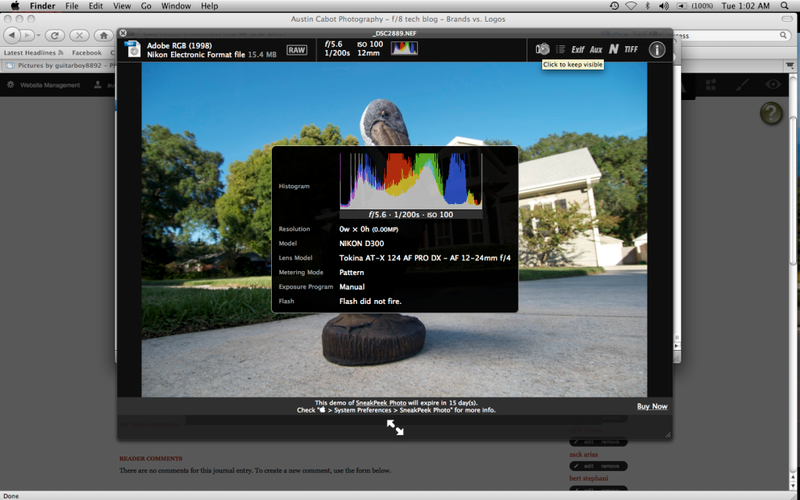
<p>You may notice that some of the information (resolution, lens, etc) is missing from the image.&nbsp; I haven't checked yet, but I am pretty sure this due to the fact that this image of <a href="http://www.modelmayhem.com/ciaracaneega">Ciara</a> was exported with Adobe Photoshop Lightroom 2.0 and some of the info may have not been exported with the image.&nbsp; With files straight from the camera, whether RAW or JPG, the lens information shows up:</p>
<p><span class="full-image-block ssNonEditable"><span><img src="http://i23.photobucket.com/albums/b395/guitarboy8892/Picture6-2.png?__SQUARESPACE_CACHEVERSION=1254200647649" alt="" /></span></span></p>
<p>All in all, I like the plugin a lot.&nbsp; Considering the <a href="http://www.apple.com/downloads/macosx/imaging_3d/sneakpeekphoto.html">Demo</a> that I got off the Apple website is free for 15 days, I'll give it a try and see how much I use it.&nbsp; Afterwards, if I find I am using it a lot (the way I think I will), it's only $9.95 to purchase through the <a href="https://www.code-line.com/software/sneakpeekphoto/">Code Line Communications</a> website.</p>]]></content></entry><entry><title>Brands vs. Logos</title><id>http://www.austincabot.com/f8-tech-blog/2009/9/24/brands-vs-logos.html</id><link rel="alternate" type="text/html" href="http://www.austincabot.com/f8-tech-blog/2009/9/24/brands-vs-logos.html"/><author><name>austin|cabot</name></author><published>2009-09-24T15:52:00Z</published><updated>2009-09-24T15:52:00Z</updated><content type="html" xml:lang="en-US"><![CDATA[<p>Found  <a href="http://blog.livebooks.com/2009/09/do-you-have-a-brand-or-do-you-just-have-a-logo/">great</a> article on the livebooks website.&nbsp; It talks about creating your brand vs. just a logo.&nbsp; Brand equity and perception vs. just the image you portray.&nbsp; It seems to be the difference in success and failure.&nbsp;</p>
<p>Do you have a brand, or just a logo?</p>
<p>&nbsp;</p>
<p>&nbsp;</p>
<p>&nbsp;</p>
<p>&nbsp;</p>
<p>&nbsp;</p>
<p>&nbsp;</p>
<p>&nbsp;</p>
<p>&nbsp;</p>
<p>&nbsp;</p>
<p>&nbsp;</p>
<p>Just something to think about.</p>]]></content></entry><entry><title>my nikon conversion</title><id>http://www.austincabot.com/f8-tech-blog/2009/9/16/my-nikon-conversion.html</id><link rel="alternate" type="text/html" href="http://www.austincabot.com/f8-tech-blog/2009/9/16/my-nikon-conversion.html"/><author><name>austin|cabot</name></author><published>2009-09-16T08:52:25Z</published><updated>2009-09-16T08:52:25Z</updated><content type="html" xml:lang="en-US"><![CDATA[<p><span class="full-image-float-left ssNonEditable"><span><img src="http://i23.photobucket.com/albums/b395/guitarboy8892/NikonLogo-1.jpg?__SQUARESPACE_CACHEVERSION=1253091280205" alt="" /></span></span>For the past year or so, I had been toying with changing up my camera equpiment.&nbsp; My main aim was at going to a full frame camera.&nbsp; I figured that most of my work pretained to landscapes, stills, and portraits, so I would benefit from full frame a lot.&nbsp; I also wanted really clean high ISO images.&nbsp; I thought about the Canon 5d, but the autofocus just didn't seem fast enough to be as versatile as I wanted my camera to be. Even though i don't shoot sports a lot at the moment, I wanted a camera that could do everything.&nbsp; The 5dmkII had the same autofocus as the original 5d, so I decided to jump ship from Canon to Nikon. Their D700, D3, and D3X cameras were exactally what I wanted.</p>
<p>They have fast 51-point autofocus, great high iso capabilities (up to ISO 25,600), and are full frame.&nbsp; Unfortunately, they cost a bit more than I could afford at the moment.&nbsp; When I got back from my trip to Nova Scotia in August, I began to look for a super good deal on a D700.&nbsp; What I found was a great deal on a D300 (crop sensor body).&nbsp; It was such a great deal that I couldn't pass it up.&nbsp; I had to have it.&nbsp; So after a few emails, I had an overnight tracking number and a lot less money in my bank account.&nbsp; Luckily I was able to sell most of my Canon equipment the same night and broke even on the whole deal.</p>
<p>Now, I know that you're going to say that it's not full frame, so why even bother?&nbsp; Well, even though it doesn't have a huge sensor, I feel the image quality it miles above my old Canon 30d.&nbsp; I plan on having a D700 or D3 by the end of the school year (goodbye tax return), and wanted to have experience with Nikon before I actually got the camera I really, really wanted.</p>
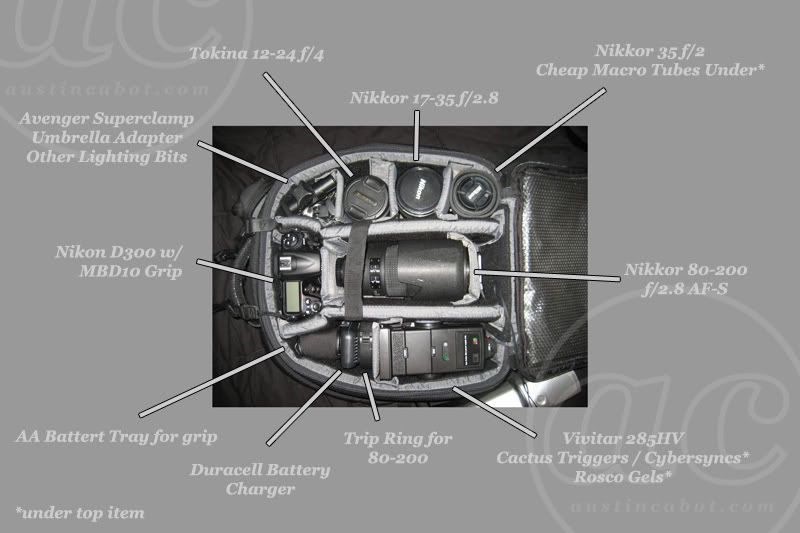
<p>Below is an image of my current Nikon line-up.&nbsp;</p>
<p><span class="full-image-block ssNonEditable"><span><img src="http://i23.photobucket.com/albums/b395/guitarboy8892/gear2.jpg?__SQUARESPACE_CACHEVERSION=1253092018940" alt="" /></span></span></p>
<p>My intial Impressions so far have been great.&nbsp; The ergonomics of the camera is much better than my 30d was.&nbsp; Where I previously had menus to adjust settings, I now have switches.&nbsp; The shutter makes a much different sound.&nbsp; I can't say that it's better, but it definately sounds more refined.&nbsp; The display is a much needed upgrade from my 30d and the grip fits the body much better.&nbsp; All in all, I feel that more thought was put into the Nikon than was in my Canon.&nbsp; I have been in Nikon camp now for about three weeks and couldn't be any happier (well, I guess I could be if I had a D700 or D3(x) that is).</p>]]></content></entry><entry><title>Free Real Estate!</title><id>http://www.austincabot.com/f8-tech-blog/2009/1/6/free-real-estate.html</id><link rel="alternate" type="text/html" href="http://www.austincabot.com/f8-tech-blog/2009/1/6/free-real-estate.html"/><author><name>austin|cabot</name></author><published>2009-01-06T09:26:49Z</published><updated>2009-01-06T09:26:49Z</updated><content type="html" xml:lang="en-US"><![CDATA[<p>Do you ever find that you need more screen space? &nbsp;I do. Especially with all the video editing and graphics work I am starting to do. &nbsp; If you are using a mac, I can help! &nbsp;By using a simple script that <a href="http://forums.macrumors.com/showpost.php?p=5272383&amp;postcount=3">I found</a>&nbsp;while googling, you can trick your mac into thinking that it has a much larger screen than it does. &nbsp;For those who don't quite understand what I am talking about, here is an example:</p>
<p>This is Native 1280x800 resolution of my macbook:</p>
<p><span class="full-image-block ssNonEditable"><span><img src="http://farm4.static.flickr.com/3066/3076985354_59ebf0dc2b.jpg?__SQUARESPACE_CACHEVERSION=1231234143611" alt="" /></span></span></p>
<p>&nbsp;</p>
<p>and this is the tricked 1440x900 resolution:</p>
<p><span class="full-image-block ssNonEditable"><span><img src="http://farm2.static.flickr.com/1197/3173643256_b579f220ac.jpg?__SQUARESPACE_CACHEVERSION=1231234203902" alt="" /></span></span></p>
<p>&nbsp;</p>
<p>See how much smaller everything appears? &nbsp;This is caused by upping the resolution, or effectively making everything smaller on the screen. &nbsp;Want to try it for yourself? &nbsp;I must warn you that some things a qwirky, and that I am not responsible for any harm you may cause to yourself or yourself. &nbsp;I'll let you know that it's suer easy and can easily be changed back though. &nbsp;Ready to try? &nbsp;Here is what you do:</p>
<p><strong>1</strong>. &nbsp;Open up the Terminal Application on your mac. &nbsp;If you don't know how to do it, go to the upper right hand corner of your screen and click the magnifying glass. &nbsp;(This is spotlight, which is essentially a search engine for your whole computer.) &nbsp;Type in "terminal". &nbsp;When the computer recognizes the terminal application, double click it to open it.</p>
<p><strong>2</strong>. Once in terminal, hit enter twice to clear out anything keys you may have accidentally hit. &nbsp;</p>
<p><strong>3</strong>. Copy/paste this script: " defaults write -g AppleDisplayScaleFactor x " into the terminal box.</p>
<p><strong>4</strong>. Decide what scale you want to use. &nbsp;I used .89 to get an effective resolution of 1440x900. &nbsp;You can chose any number you want, but they may work differently.</p>
<p><strong>5</strong>. In the script that you pasted into terminal, replace the ending "x" with the number you picked. &nbsp;**HINT** TO RESET THE RESOLUTION TO THE NATIVE, ENTER "1".</p>
<p><strong>6</strong>. Hit enter to enter the script.</p>
<p><strong>7</strong>. Close terminal and any other applications you have open. &nbsp;Upon opening up each application, your resolution should be reset to a larger one. &nbsp;It's been reported that not all applications like this trick, so your results may vary. &nbsp;<span style="text-decoration: underline;">I'm not responsible for any harm done to your computer/personal being</span>.</p>
<p><strong>8</strong>. Upon restarting the computer, everything will be reset.</p>
<p>If you don't like the results (there are quirks) simple follow the steps again, but pay attention to the ALL CAPS in step 5.</p>
<p>&nbsp;</p>
<p>Well, that was easy wasn't it? &nbsp;More space for those times you need it. &nbsp;You can easily reset it to the default, so there really is nothing to loose. &nbsp;At least try it once. &nbsp;Let me know what you think in the comments.</p>]]></content></entry><entry><title>What do you use?</title><id>http://www.austincabot.com/f8-tech-blog/2008/12/2/what-do-you-use.html</id><link rel="alternate" type="text/html" href="http://www.austincabot.com/f8-tech-blog/2008/12/2/what-do-you-use.html"/><author><name>austin|cabot</name></author><published>2008-12-02T08:13:42Z</published><updated>2008-12-02T08:13:42Z</updated><content type="html" xml:lang="en-US"><![CDATA[<p>I'm interested to see what the people reading this part of the website use to shoot with, or if they are even photographers, so that I can figure out what I will start to post. &nbsp;If you've got a minute, leave me a comment answering the question below. Don't worry, you don't have to register on the site or anything, so I can't sell your email address (though I could use the money at the moment).</p>
<p>
<ul>
<li>Do you take pictures?</li>
<li>Do you consider your self a photographer?</li>
<li>What type of camera do you use?</li>
<li>Are you interested in learning more about photography?</li>
<li>How do you like me now? (ok, kidding about that one, not sure I want the answers)</li>
</ul>
</p>
<p>Thanks guys. &nbsp;I look forward to making this a place for you to use and utilize. &nbsp;Got questions? &nbsp;Leave them for me here in the comments of this part of the site. &nbsp;I'll answer them as soon as I can and to the best of my&nbsp;abilities.</p>
<p>&nbsp;</p>
<p>Happy December.</p>
<p>~ Austin</p>]]></content></entry><entry><title>My Gear</title><id>http://www.austincabot.com/f8-tech-blog/2008/9/23/my-gear.html</id><link rel="alternate" type="text/html" href="http://www.austincabot.com/f8-tech-blog/2008/9/23/my-gear.html"/><author><name>austin|cabot</name></author><published>2008-09-23T19:20:45Z</published><updated>2008-09-23T19:20:45Z</updated><content type="html" xml:lang="en-US"><![CDATA[<p style="text-align: left;">For those of you interested in my gear:<br><span style="font-weight: bold; "><span style="text-decoration: underline; -webkit-text-decorations-in-effect: underline; ">Camera</span></span><br>Canon 30d<br>Canon BG-E2 Grip<br>Canon 24-70 f/2.8 L <br>Ricoh GR Digital II<br><br><span style="font-weight: bold; text-decoration: underline;">Lighting</span><br>Canon 580ex<br>Canon 430ex<br>Lumpro 8ft. Air Cushioned Light Stand<br>43" Westcott Umbrella - reflective soft silver<br>60" Westcott Umbrella - Convertible white/black<br>28" x 28" Westcott Apollo Softbox<br>Modded eBay Cactus Triggers<br><br>That's it.  Pretty much a camera and some lights.<br></p><p><br></p>]]></content></entry></feed>